CNC Router vs Milling Machine
Quick answer: show me the part first
If most of your work is full sheets, furniture panels, signs, acrylic, plastics or foam, a CNC router is normally the easier place to start. If you are mainly making compact metal parts with deep pockets or heavier cutting, a CNC mill or machining center is usually the better fit.
After that, we look at the part size, material, cutting depth, tolerance, tools, workholding and output. Plenty of machines can make one successful cut. The better question is which one can make your normal parts every day without creating extra setup, finishing or rework.
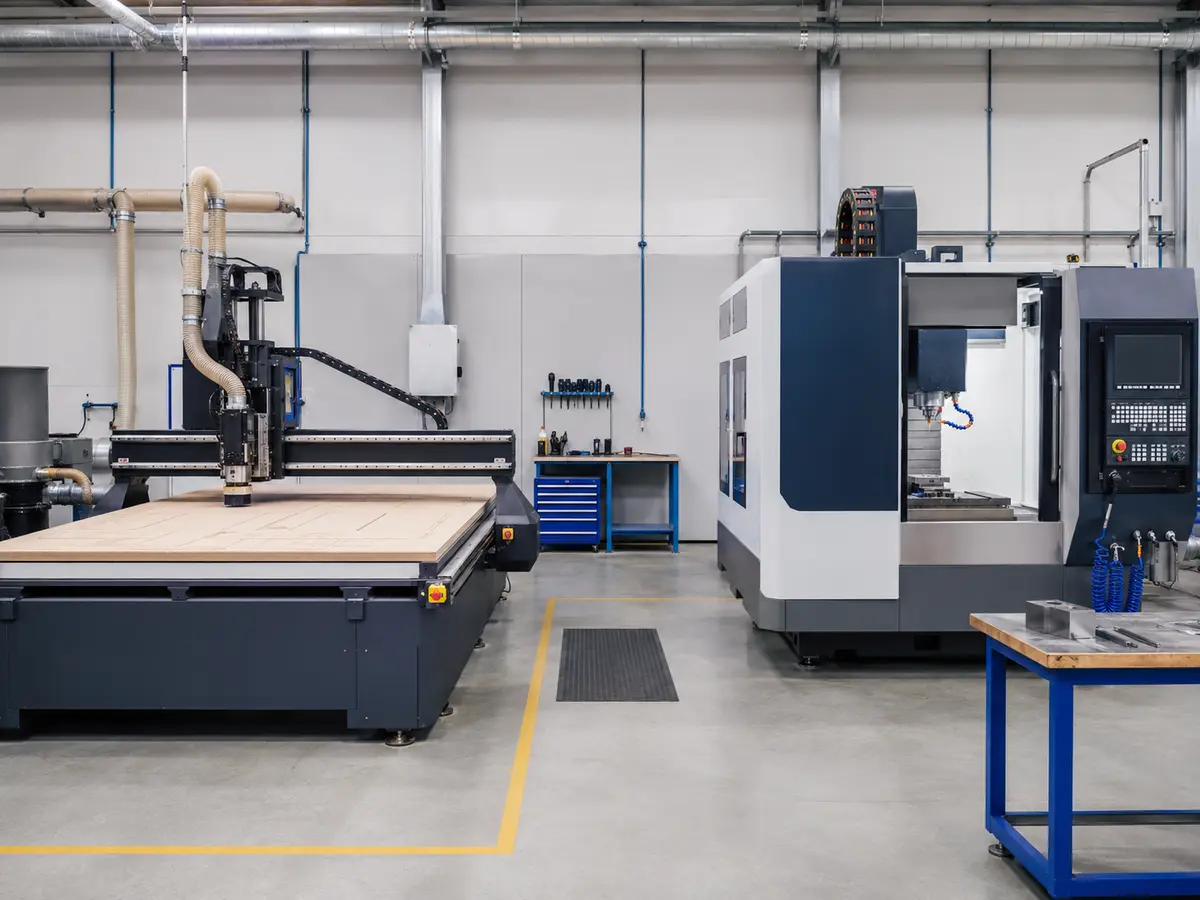
CNC router or mill? Start with the kind of part you make
In this guide, “milling machine” mainly means a CNC mill or machining center used for compact metal parts. Large-format gantry mills are a different class of machine, so do not use this comparison as a rule for every type of mill.
A CNC router makes the most sense when the job starts with a large sheet or panel. Cabinet parts, doors, signs, acrylic sheets and similar work all benefit from having a wide X/Y working area.
A milling machine comes into its own when the part is smaller, the material is metal and the cutting load is heavier. In that kind of job, rigidity matters more than having a very large table.
So I would not start by arguing over the machine name. Put the part on the table first. A 4 × 8 ft sheet that needs nesting, drilling and profiling points naturally toward a router. A compact metal block with deep pockets and tighter metal-machining requirements points toward a mill.
| What matters | CNC router | Milling machine |
|---|---|---|
| Typical workpiece | Large flat sheets and panels | Compact blocks, plates and mechanical parts |
| Common materials | Wood, MDF, plywood, plastics, foam, acrylic and some compatible soft-metal work | Metals and compact engineering materials within the machine’s rated capability |
| Typical work | Nesting, profiling, engraving, drilling and repeated sheet processing | Pocketing, drilling, facing, contouring and heavier material removal |
| Working area | Usually wide in X and Y | Usually smaller, with a work envelope aimed more at fixtures and compact parts |
| Holding the part | Vacuum zones, spoilboards, T-slots, clamps or fixtures | Vises, clamps, fixture plates, chucks or dedicated fixtures |
| Tool changes | Manual or ATC, depending on the setup | Often built into the normal machining workflow |
| Easy mistake to make | Choosing by table size or spindle power alone | Choosing by the word “mill” without checking the real envelope, tooling and job |
Tip: when we look at a new router job, we normally ask about the part size, material and operations before we talk about spindle power. Those three answers usually narrow the machine down very quickly.
Machine weight matters, but it is not the whole story
A heavier machine can be a good sign, but weight on its own does not tell you whether the machine fits your work. What you really need is a structure that keeps the tool stable at the cutting load you plan to use.
A large gantry gives a router the reach needed for sheet work, but gantry design, Z extension, transmission and workholding still matter. A compact mill can be better at heavier cutting, but that strength is useless if your part or fixture cannot fit inside the machine.
When two machines both look possible, these are the things I would compare:
- Usable X/Y area, Z travel and real clearance under the spindle or gantry.
- How much room is left after the fixture, spoilboard, tool and clamps are installed.
- Spindle speed range, usable torque, duty cycle and tool interface.
- Guideways, transmission, drive system and overall machine structure.
- Vacuum, clamps, chip removal, dust extraction and coolant or lubrication needs.
- Controller functions, CAD/CAM workflow and the correct post processor.
A good component is useful, but one impressive component does not make the whole machine right for the job. Servo motors, ball screws, rack-and-pinion drives and spindle ratings only matter when the complete setup works with your part and process.
Working with sheets, wood or large plastics? A router is usually the easier fit
For cabinet parts, furniture panels, doors, signs and large acrylic or plastic sheets, a CNC router usually gives you the simpler workflow. Load the sheet, then profile, drill, groove or engrave without first cutting everything into smaller blanks.
If the same part needs several tools, ATC starts to become useful very quickly. If you are only doing simple profile cutting, that extra tool-change setup may be more machine than you actually need. You can also compare 3-axis, 4-axis and 5-axis CNC router differences when the part geometry—not the material—is what drives the choice.
For acrylic, tooling, chip removal, hold-down and heat control matter a lot. Our CNC acrylic cutting guide goes deeper into that process.
Can a router cut aluminum? Yes, if the job suits the machine
Some CNC routers set up for non-ferrous metal work can machine aluminum. What matters is whether the machine can hold the part properly, clear the chips, run the right cutter and keep the result stable at the tolerance and output you need.
For aluminum, send the grade, part size, thickness, deepest pocket, hole sizes, tolerance and batch size. Once we know how the part will be clamped, we can look at the spindle, tooling, chip removal and lubrication or cooling around the real job.
If most of your work is steel, hard alloys, deep metal removal or compact precision metal parts, a woodworking-style router is the wrong starting point. That work is better matched to a machine built for those cutting loads.
Cutting-speed note: A router’s high spindle RPM does not automatically make it faster than a mill. Feed, cutter geometry, chip load, depth of cut, machine stability and chip removal still have to match the material. See the CNC Feed Rate and Spindle Speed guide for the detailed cutting-parameter discussion.
The published working area is not always the space you can really use
The brochure number is only the starting point. Tool length, clamps, fixtures, spoilboard height, dust shoes, rotary devices and gantry clearance can all take away some of that usable space.
If the part is thick, tall or needs a substantial fixture, a clearance drawing is much more useful than Z travel alone. It is also worth checking the total machine footprint and the space needed to load the largest workpiece, open the electrical cabinet and service the machine.
Accuracy: compare the finished part, not the machine label
Do not assume a mill is automatically more accurate or that a router is automatically less accurate. Finished-part accuracy comes from the machine, tool, material, workholding, cutting conditions and inspection method working together.
If tolerance matters, define the dimensions that actually matter and test a representative part under the real cutting setup. Positioning or repeatability numbers are useful, but they are not the same thing as a finished-part result under load.
For the deeper accuracy discussion, see How Accurate Is a CNC Router?
Good workholding matters more than most people expect
You can have plenty of spindle power and still get a poor result if the sheet lifts, a small part moves or chips keep getting dragged back through the cutter.
Vacuum tables are very practical for sheet work, but real hold-down depends on the vacuum system, zones, leakage, spoilboard condition, contact area and part geometry. Becker’s woodworking guidance also discusses porous spoilboards and table leakage in CNC vacuum hold-down systems. See Becker’s CNC vacuum hold-down guidance.
Small parts, thick blocks and heavier cuts often work better with mechanical clamps or dedicated fixtures. With wood and composites, dust extraction needs to be part of the setup. With aluminum and plastics, the main thing is getting chips away from the tool instead of cutting them again.
Tip: workholding is one of the first things worth talking about. The part has to stay exactly where the program expects it to be.
Can you use the same CAD/CAM? Often yes, but the post still has to match
You can often reuse the design file, but the machining setup does not automatically transfer with it. The CAM strategy, controller, axis layout, tool-change logic, work offsets and spindle commands still need to match the machine you are actually running.
The post processor is the piece that converts the CAM job into NC code for a specific machine-control setup. Autodesk explains why a generic post may not match every CNC configuration. See the Fusion post-processing overview.
Before you run production, a new or modified post should be checked with simulation, code review and a careful prove-out on the machine. In simple terms, the same CAD file does not mean the same machining program.
Which one is faster? Look at a full shift, not one speed number
A router’s rapid speed and a mill’s feed rate are not the same number, so comparing them directly does not tell you much. Production time includes everything that happens before and after the cutter touches the part.
| Part of the cycle | What to look at |
|---|---|
| File preparation | How much nesting, CAM work and post processing does the job need? |
| Loading | Can you load full sheets or heavy blanks without slowing the cell down? |
| Setup | How long do fixtures, vacuum zones, alignment and work offsets take? |
| Cutting | Can the machine hold the required cut on the real material? |
| Tool changes | How many tools does the part use, and are the changes manual or automatic? |
| Unloading | Do parts need sorting, labeling, cleaning, inspection or another process before they are accepted? |
A router can save a lot of handling on nested sheet work because the full sheet stays on one table. A mill can be very efficient on a compact multi-feature metal part when the fixture and tooling are right. For me, the useful number is accepted parts per shift, not one impressive speed from the specification sheet.
Router, mill or both? Match the machine to the recurring work
Start with a CNC Router
Large sheets, nested parts, wood products, signs, acrylic, plastics, foam and other jobs where working area and sheet workflow matter most.
Start with a Milling Machine
Compact metal parts, deeper metal removal, rigid mechanical fixturing and jobs built around heavier metal-cutting loads.
Use Both When the Work Really Splits
A router can handle panels while a mill makes compact metal fixtures or components. Two machines make sense when you genuinely have two recurring process families—not because one machine brochure promises to do everything.
Cost note: Compare the cost of making your normal parts, not only the purchase price. For this router-vs-mill decision, the biggest hidden differences are often workholding, tooling, manual handling, secondary finishing and whether one machine forces extra setups.
Send us one normal part and we can narrow it down
You do not need to prepare a long technical document before talking to us. One normal part, plus the material and size, usually tells us much more than a message saying “I need a powerful CNC machine.”
- Drawing or photo: DXF, CAD file, part drawing or a clear photo of one normal part.
- Material: exact material and grade if you know it.
- Size: common and maximum part or sheet size, plus thickness.
- Operations: cutting, drilling, engraving, grooving, pocketing or 3D work.
- Output: normal batch size and daily or shift target.
If a tolerance or surface requirement is critical, include it with the drawing. Power, air, extraction, floor space and software can come next once the machine family is clear.
Tip: send the part first. Once we know the material, size, operations and output target, we can usually tell pretty quickly whether you should be looking at a standard router, ATC setup, another CNC router configuration or a milling machine.
Workshop note: Router and mill installations can need different workholding, dust or chip control, guarding, tooling, power and air. Plan these around the final machine and follow the machine/tool manuals plus the workplace requirements where it will be installed.
Send the part. We will help you narrow the machine down.
Send the drawing, material, part size, operations and output target. From there, we can narrow the working area, hold-down method, spindle and tooling approach, tool-change needs and the machine type that makes the most sense for your job.
You can also review Quick CNC applications and our woodworking CNC router guide.
Send Your Drawing & RequirementsFrequently asked questions
Is a CNC router the same as a milling machine?
No. Both use CNC-controlled axes and rotating cutting tools, but they are normally built around different workpiece sizes, cutting loads, workholding and production jobs. The actual machine and the work you plan to run matter more than the name on the category.
Can a CNC router cut metal?
Some properly configured routers can machine compatible non-ferrous metals such as aluminum. If metal is the main workload, check the machine structure, spindle, tooling, clamping and chip-control setup before deciding.
Is a milling machine always more accurate than a router?
No. Finished-part accuracy comes from the complete machine and process. Compare the tolerance you need on a real part instead of assuming the machine category tells you the answer.
Is spindle power enough to compare the two machines?
No. Torque, speed range, duty cycle, tool interface, structure, workholding, tooling and chip control all matter. A large spindle number is useful only when the rest of the machine fits the job.
Which machine is better for cabinet and furniture panels?
Start with a CNC router. Full-size panels, nesting, profiling, grooving and drilling fit the router workflow much more naturally. The number of tools and the production flow then decide whether a basic router, ATC or a more automated setup makes sense.
Should I request a sample before buying?
If tolerance, edge quality, cycle time or material behavior matters to the purchase, yes. Use your own material and drawing, then inspect the dimensions and finish that matter on the real product.

Frannie
Hello, I’m Frannie, a CNC machinery specialist with 15 years of experience in the woodworking CNC industry. I help furniture factories, cabinet makers, woodworking workshops, and production businesses choose CNC machines that match their production needs, factory size, budget, and efficiency goals.
My work focuses on solving real production problems, including replacing outdated equipment, improving machining efficiency, reducing labor costs, and upgrading to smarter CNC solutions. I also support customers with machine installation guidance, operation training, video support, and on-site training when needed, helping them use their machines more confidently and effectively.





