Quick Answer
Do not judge a CNC router by one component
A CNC router is a complete system. The frame, motion system, spindle, tools, workholding, controller and software all have to suit the same job.
You can put a very good spindle on a machine and still get bad parts if the sheet moves. A famous servo brand does not help much if the axis is badly sized. And a large vacuum pump will not solve a hold-down problem if the spoilboard, zoning or nesting layout is wrong.
So when you compare machines, start with four things: what you cut, how big the parts are, what operations you run and how much you need to produce. Once we know that, choosing the right parts becomes much easier.
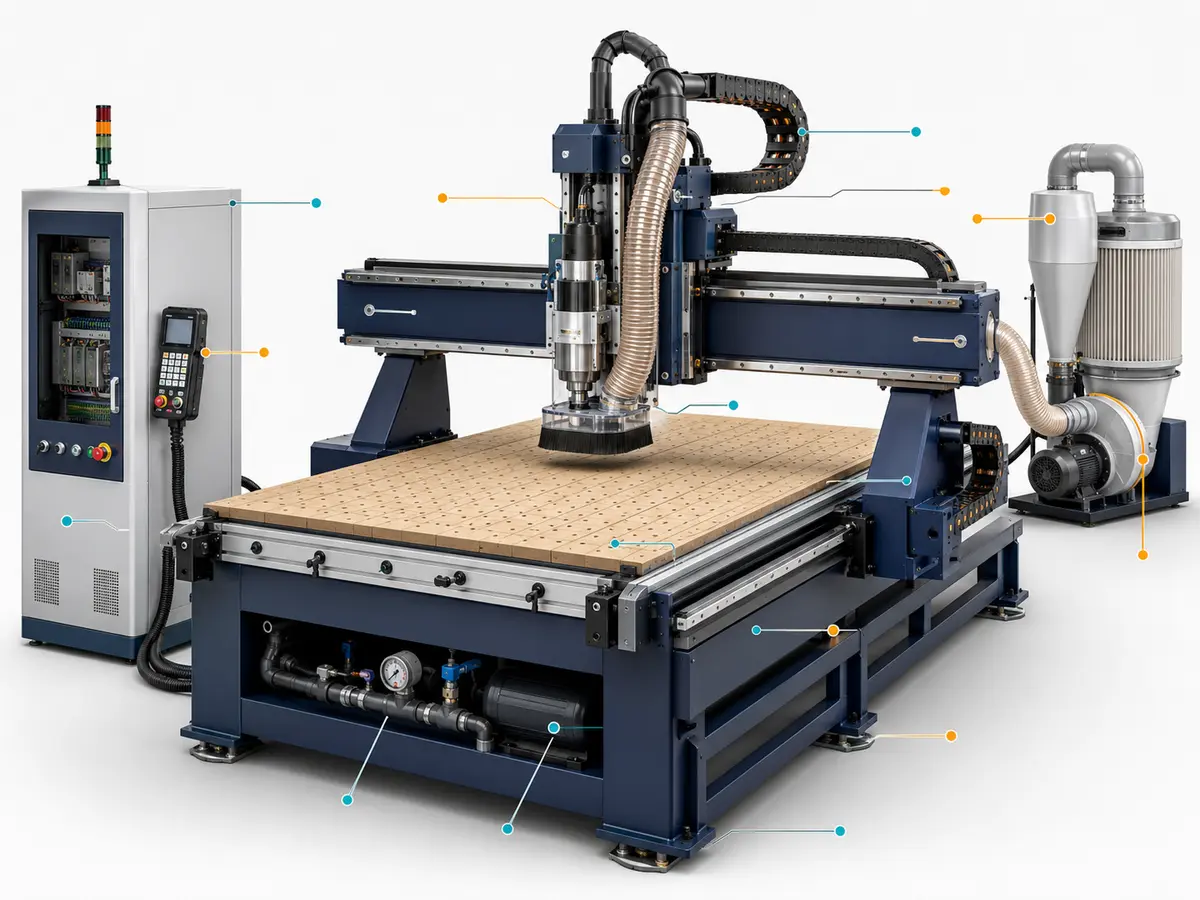
Start with the parts that actually change how the machine runs
You do not need to memorize every component inside a CNC router. What matters is knowing which systems have a real effect on cutting, stability, setup time, tool changes and daily production.
We normally split them into two groups: the parts every CNC router needs, and the systems you add because your production needs them.
The main parts every CNC router needs
| Part | What it does | What you should really look at |
|---|---|---|
| Frame and base | Supports the machine and carries the cutting loads | Working area, gantry span, structure, stability and how the frame is built |
| Gantry and Z axis | Carry and position the spindle | Usable clearance, stiffness, tool length and fixture height |
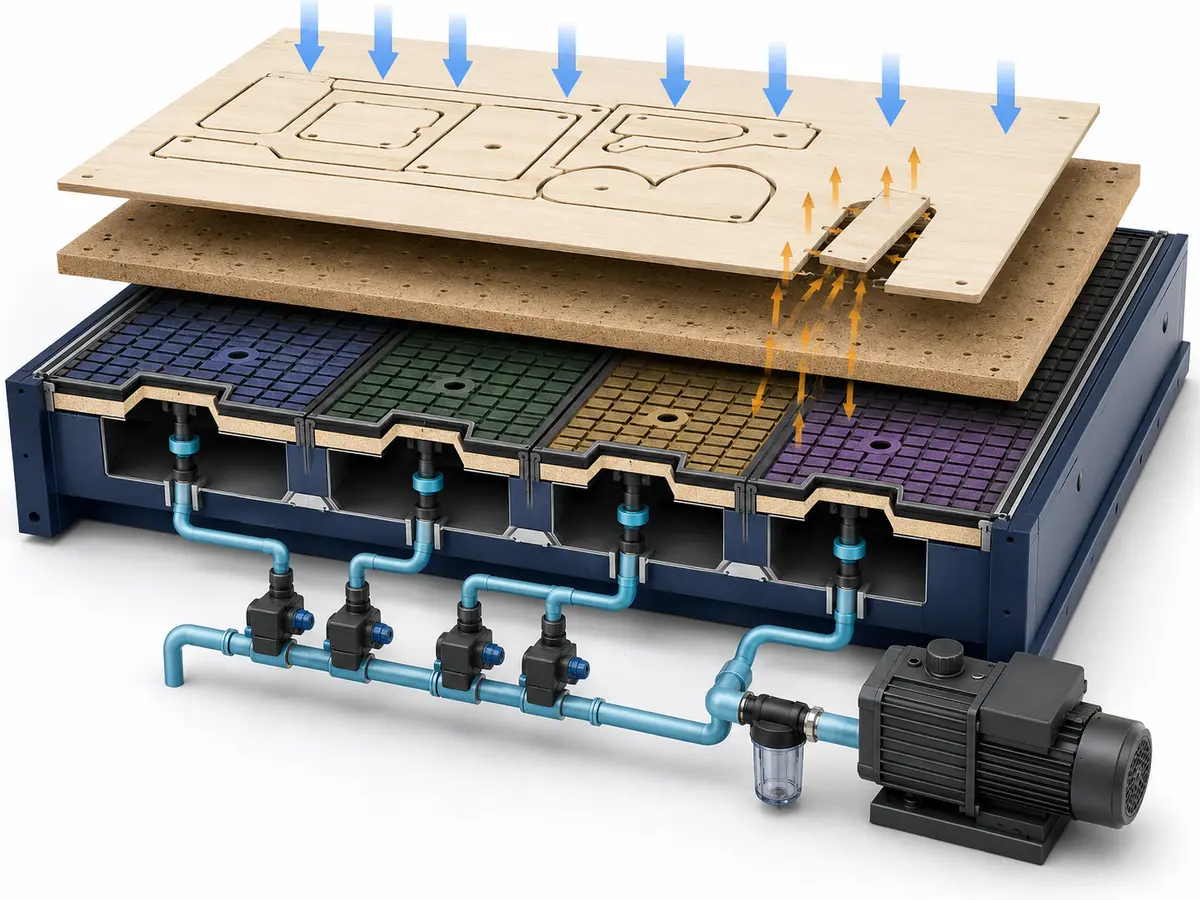
| Worktable | Supports or holds the material | Usable area, vacuum zones, T-slots, clamps, pods and spoilboard setup |
| Linear guides | Guide the moving axes | Size, spacing, mounting, lubrication and protection |
| Rack, pinion or ball screw | Turns motor rotation into axis movement | Which axis uses which system, travel length, load, backlash control and maintenance |
| Motors and drives | Move the axes | Whether they are sized properly for the load, speed and acceleration you need |
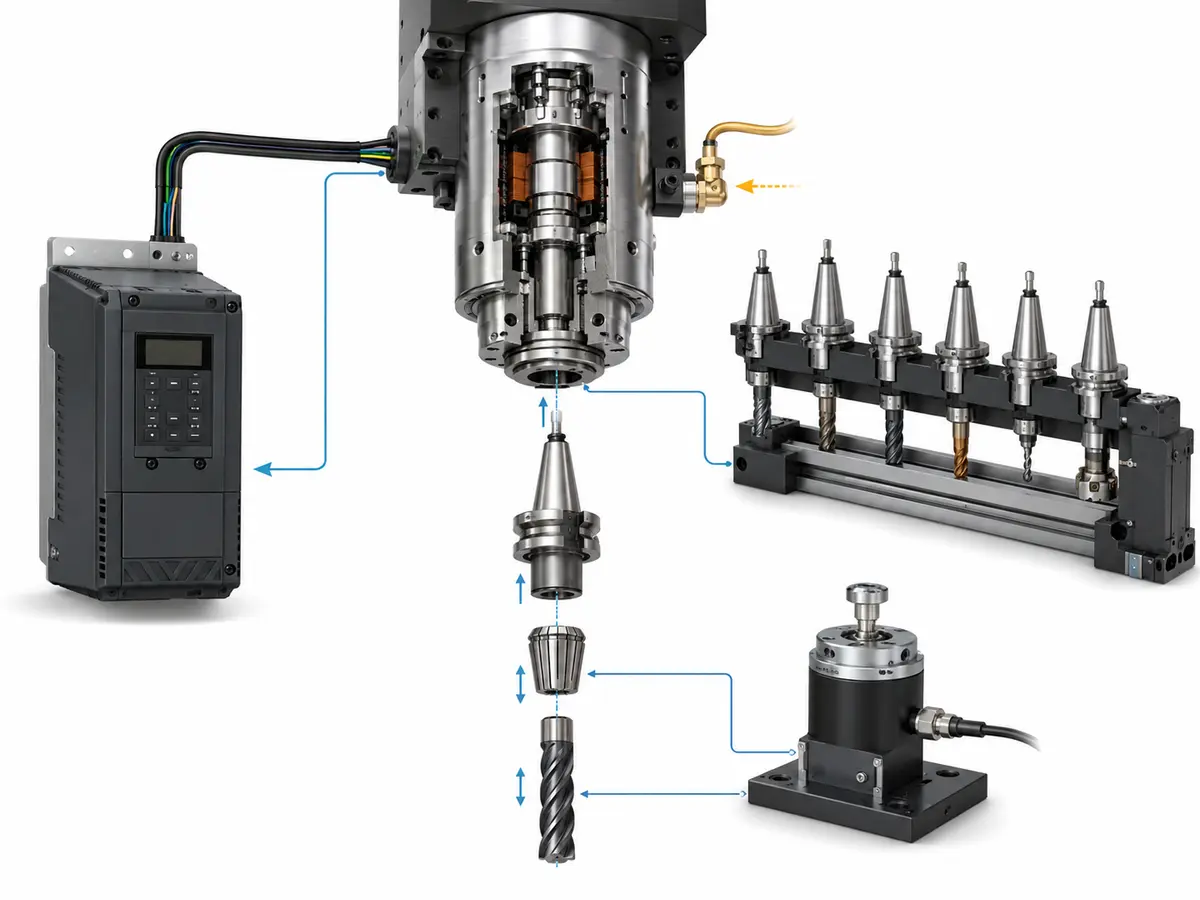
| Spindle and VFD | Rotate and control the cutting tool | Material, cutter size, duty, holder, speed range and cooling |
| Holder, collet and cutter | Connect the spindle to the cutting edge | Runout, shank size, tool projection, cleanliness and replacement availability |
| Controller | Runs the CNC program and coordinates the machine | File workflow, tool management, axis support, faults, backups and operator use |
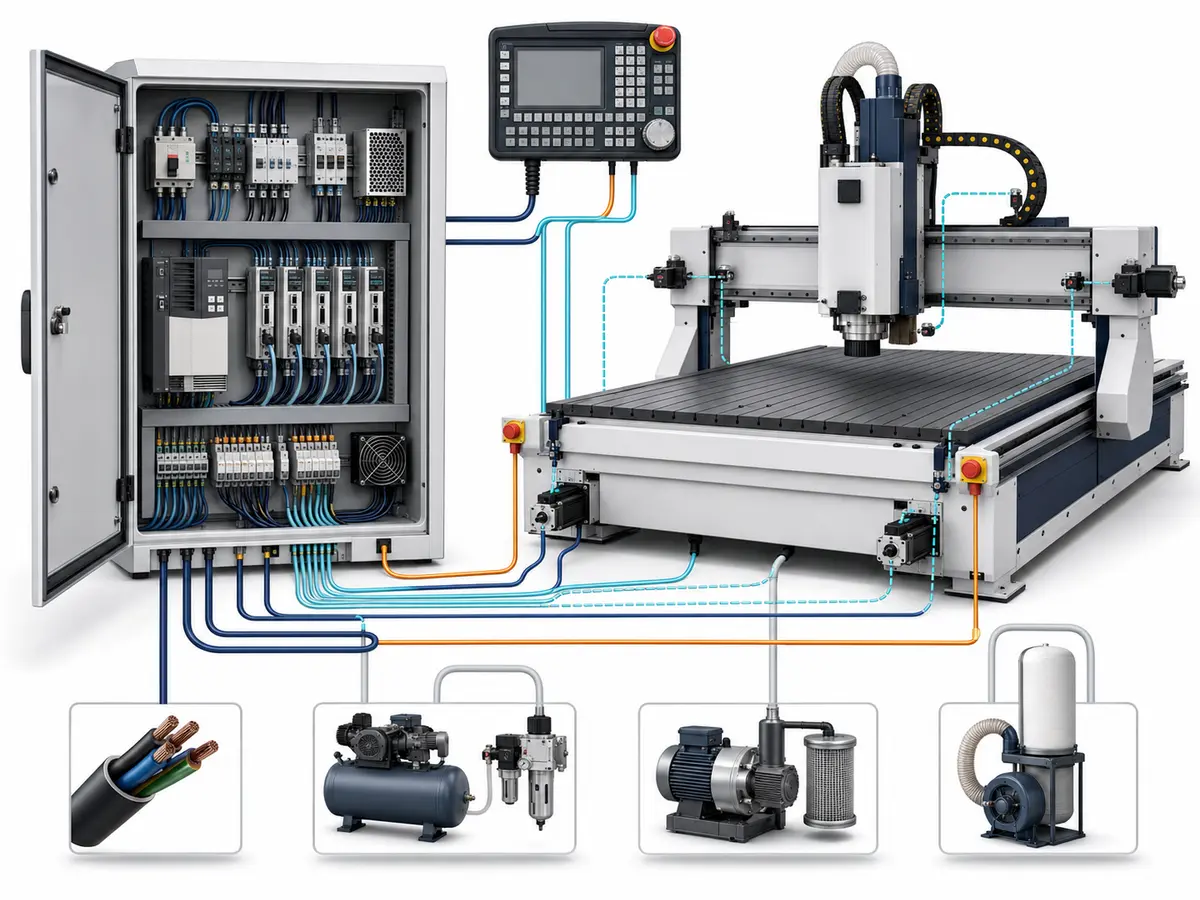
| Electrical system | Distributes power and connects the control hardware | Voltage, cabinet layout, cooling, documentation and troubleshooting access |
| Workholding | Keeps the part from moving while it is cut | Your smallest part, material, cutting direction, fixture clearance and hold-down method |
Parts you add when production actually needs them
| System | When it starts to make sense | What to check |
|---|---|---|
| Automatic tool changer | Your normal programs use several tools | Tools per job, rack capacity, holders, air supply and recovery after an interrupted change |
| Drill bank | You have repeated drilling patterns or panel drilling work | Hole direction, spindle layout, software output and part handling |
| Tool setter | Tools are changed often and consistent tool reference matters | How tool measurement fits into the normal setup routine |
| Automatic lubrication | The machine runs frequently and you want a simpler lubrication routine | Lubrication points, intervals and maintenance access |
| Loading and unloading | Sheet handling is becoming a bottleneck | Sheet size, layout, labor, available floor space and downstream flow |
| Labeling | You need part identification to connect cutting with later production steps | Software, label data and the rest of the production line |
| Rotary or multi-axis units | Your parts need machining from angles that a normal 3-axis setup cannot reach efficiently | Part geometry, clearance, CAM, controller and post-processor support |
Tip: More parts do not automatically mean a better machine. Every extra spindle, drill head, axis or automation unit adds cost and complexity. If it saves you a real production step, good. If it sits unused most of the week, it probably was not money well spent.
If you only need the basic explanation of what a CNC router is and how the machine works, see What Is a CNC Router Machine?. This page goes deeper into the components and how they affect the complete machine.
All these parts have to work as one chain
This is the easiest way to understand a CNC router: your drawing becomes a toolpath, the controller reads that toolpath, the drive and motor move the axes, the spindle turns the cutter, and the workholding keeps the part still while all of this is happening.
If one part of that chain is wrong, you can still end up with scrap.
A strong spindle cannot fix a sheet that moves. A very good servo cannot fix the wrong toolpath. A good controller will not help if the post-processor is sending the wrong commands.
CAD/CAM → post-processor → controller → drive → motor → transmission → axis movement → spindle and cutter → workpiece
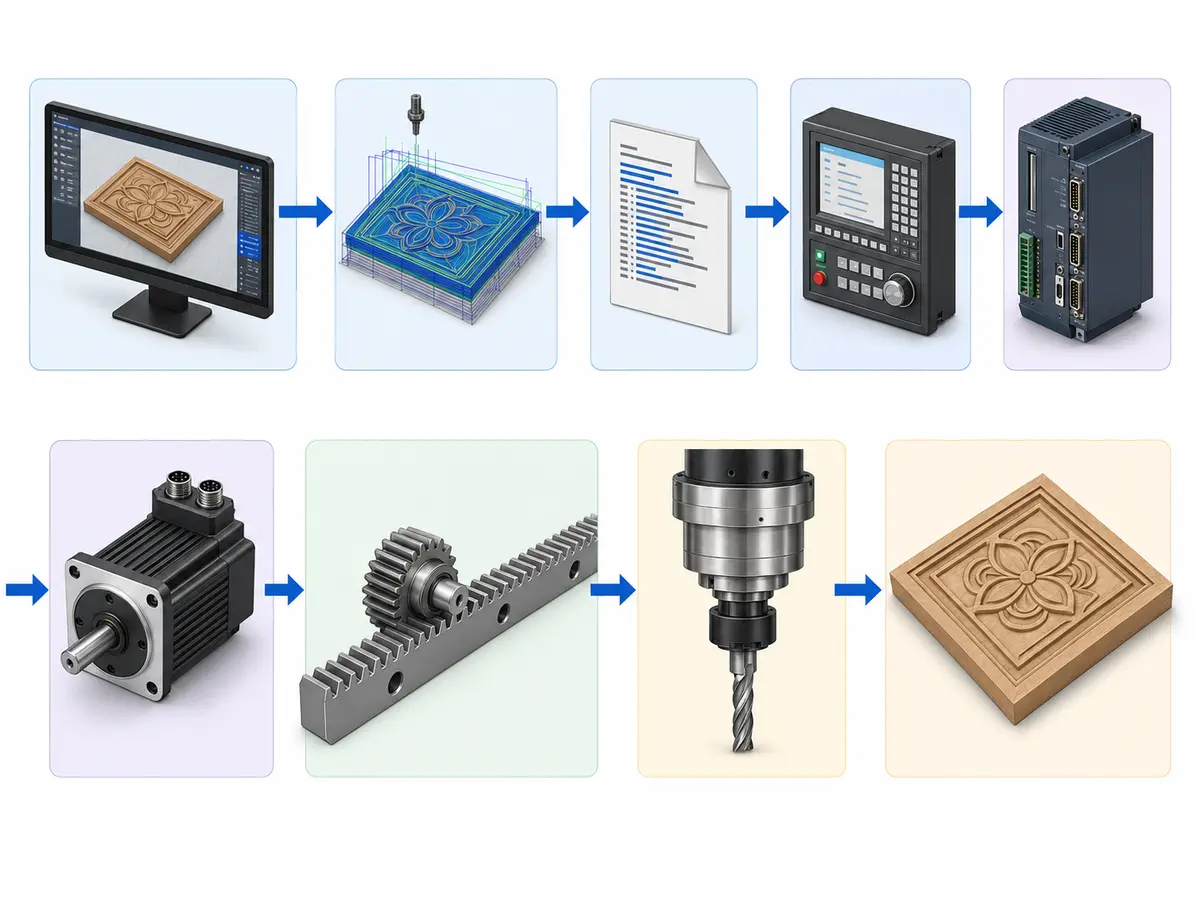
Tip: When two machines look almost the same on paper, do not start by asking which one has the more famous component brand. Start with your normal part and follow this chain from the drawing all the way to the finished cut.
Structure first: if the machine moves, the cut moves with it
Frame and base: machine weight is only one clue
A heavier machine can be useful, but weight alone does not tell you whether the structure is good.
The frame has to suit the working area, gantry span, moving mass and the type of cutting you plan to do. A large machine doing aggressive work asks more from the structure than a compact machine doing light engraving.
When you compare two routers, look past the paint and total weight. Check how the frame is built, how the gantry is supported and whether the structure makes sense for the job.
Gantry and Z axis: more clearance is not always better
The gantry carries the cutting head across the machine. The Z axis gives you the vertical movement.
Extra Z clearance sounds good on a quotation, but there is no point paying for a very tall Z axis if you only cut 18 mm MDF sheets every day. More height also has to be considered together with tool length, fixtures, workpiece thickness and stiffness.
If you machine thick molds, fixtures or tall parts, then the extra space can be important. If you cut flat panels, it may not add much value.
Bed, table and spoilboard are not the same thing
The bed is part of the machine structure. The table supports or holds the workpiece. The spoilboard is the replaceable layer commonly used on a vacuum table when cutting through sheet material.
For sheet cutting, pay attention to usable table size, vacuum zones, spoilboard condition and how much area stays exposed during cutting.
For solid wood, plastics, fixtures or individual parts, clamps, T-slots or pods may matter more than a full-sheet vacuum table.
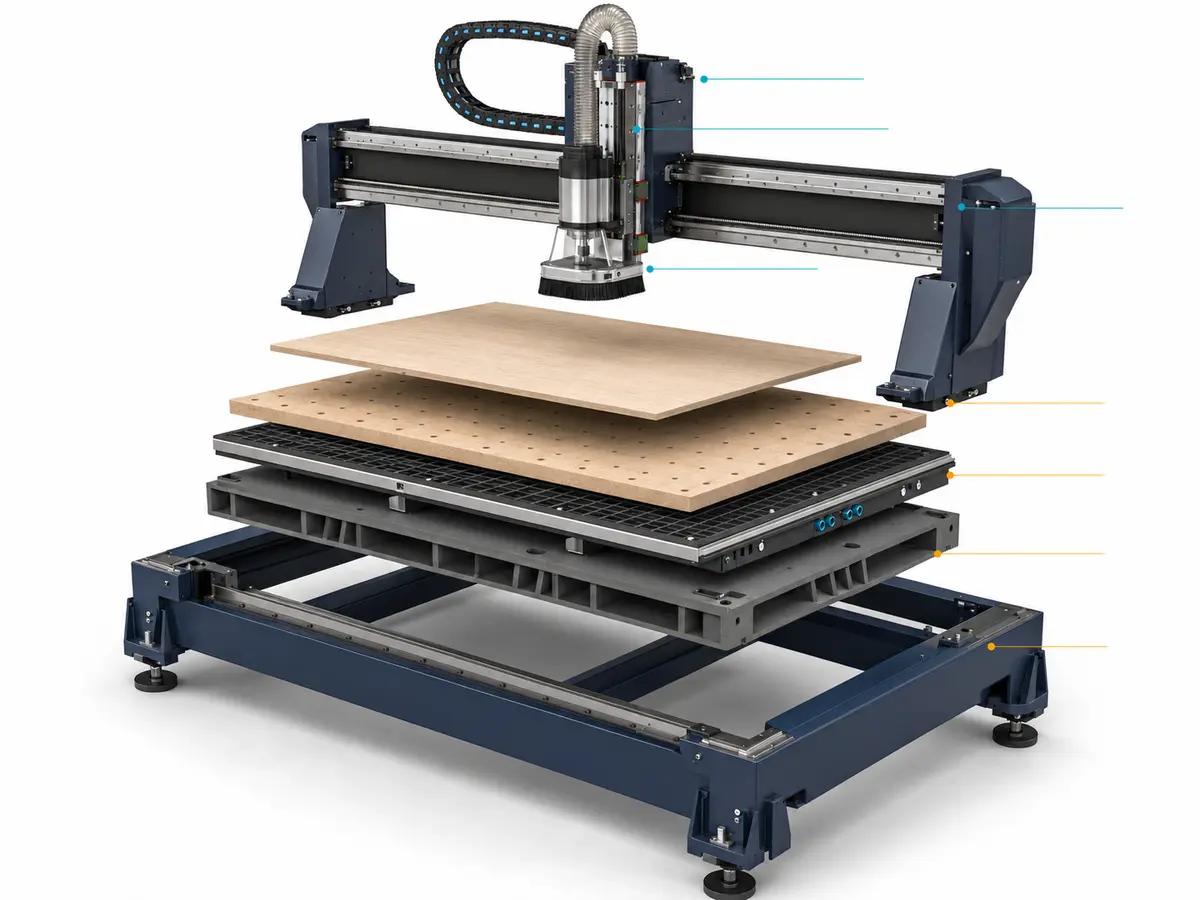
Motion system: smooth, stable movement matters more than the name on the label
Linear guides: brand matters, but the complete setup matters more
The rails guide the axis. The bearing blocks carry the moving load.
A familiar rail brand is a good sign, but it is only one part of the story. Rail size, spacing, mounting surface, alignment, lubrication and protection all affect how the system performs.
If someone gives you only a rail brand and expects that to prove machine accuracy, that is not enough information.
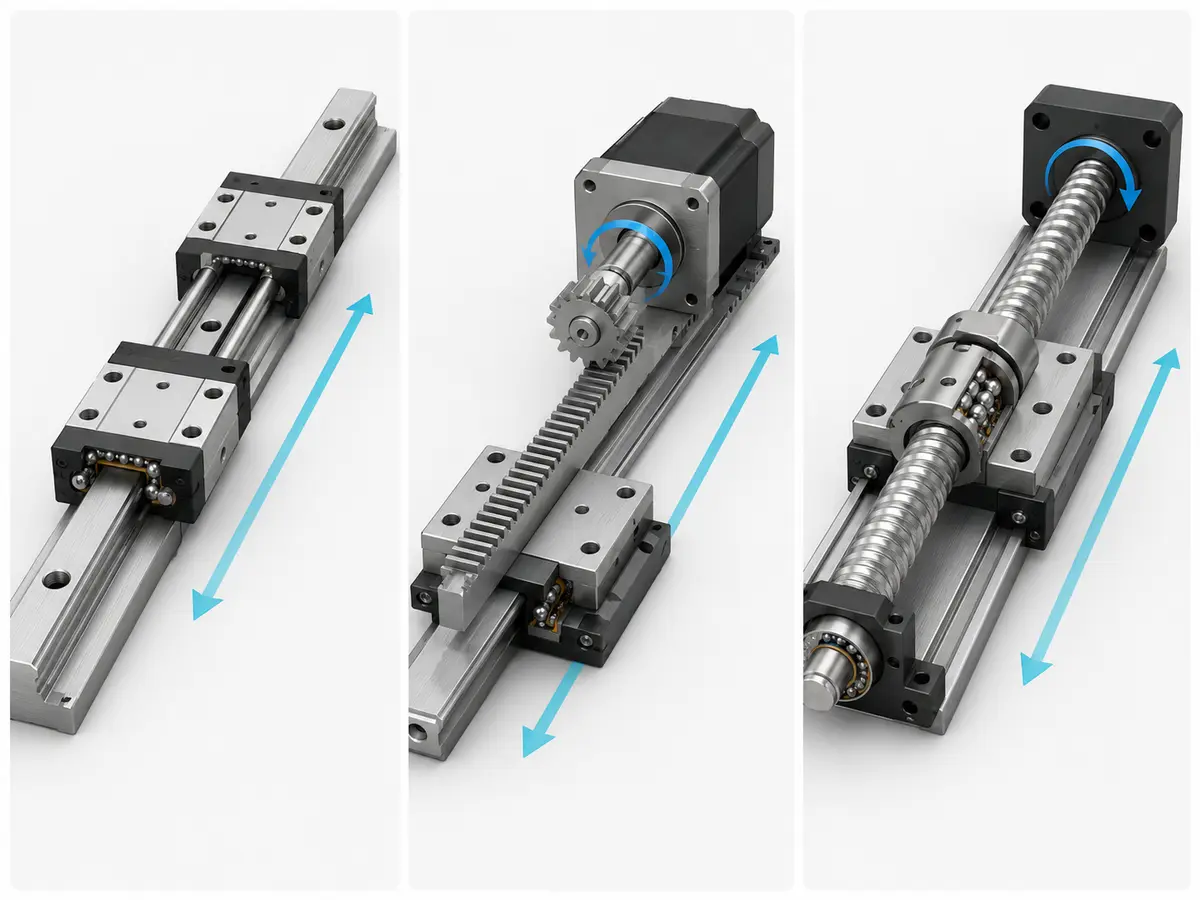
Rack or ball screw? Look at the axis first
You will see both systems on CNC routers. Long X and Y travel and shorter Z travel do not always need the same transmission.
Instead of asking which system is “better” in general, look at travel length, load, speed, acceleration, backlash control, protection and maintenance.
THK explains how a ball screw converts rotary motion into linear motion, but that does not mean a ball screw is automatically the best choice for every CNC router axis.
Stepper or servo? Good sizing beats a famous label
Both can work well when the machine is designed around them properly.
A servo system is often chosen when higher motion performance, feedback and more demanding production are involved. But simply writing “servo motor” on a quotation does not tell you whether the motor and drive are sized properly for the axis.
Check axis load, transmission ratio, speed, acceleration, feedback and how the controller handles faults.
Tip: If someone keeps talking about the servo brand but cannot explain why that motor size and drive setup fit the actual axis load, you still do not have the information you need.
Sensors and encoders: do not mix up their jobs
An encoder provides motion feedback in a feedback system. A home sensor gives the machine a reference during homing. Limit or overtravel devices help define travel boundaries.
They are useful, but none of them alone proves what accuracy you will get on a finished cabinet door, acrylic part or mold.
Finished-part accuracy still depends on the machine, cutter, material, fixture, calibration, program and measurement method working together.
Spindle, tools and ATC: this is where the cutting actually happens
Spindle and VFD: do not choose by kW alone
Spindle power is easy to compare, so it often becomes the first number people look at. It should not be the only one.
What are you cutting? What cutter diameter do you normally use? How deep are the cuts? How much material do you want to remove? How long will the spindle run each shift?
Those questions tell us much more than simply saying “I want the biggest spindle.”
The spindle also has to match the holder, speed range, cooling, electrical supply, cutter and the rest of the machine.
Tip: If most of your work is full-sheet MDF cutting, do not choose the spindle first. Check the cutter, feed target, vacuum holding and tool changes together. A larger spindle will not stop a small nested part from moving.
Holder, collet and cutter: small parts, big effect
These are easy to overlook because they are much cheaper than the machine, but they are sitting right between the spindle and the material.
A dirty collet, worn holder, excessive tool projection or damaged cutter can quickly show up in cut quality.
Check the holder standard, collet sizes, cutter shank sizes and how easy replacement holders and collets will be to source later.
ATC: useful when you actually use several tools
Automatic tool changing makes a big difference when one program needs several cutters.
For example, if a part needs cutting, pocketing, drilling and engraving, stopping the machine every time you change tools soon becomes a bottleneck.
An ATC setup normally involves the spindle, holders, tool rack or carousel, sensors and pneumatic tool release. So do not compare only the number of tool positions.
Ask how many tools your normal program uses, how easy the rack is to access and what happens if a tool change is interrupted.
Drill bank: useful when drilling is really part of the job
If your parts have many repeated holes, especially furniture panels, adding a drilling unit can save handling and secondary work.
But first check the hole directions, diameters and patterns. A drill bank is only useful if its spindle arrangement matches the holes you actually make.
HSD shows woodworking boring-head configurations with different drilling arrangements. The important question is still whether the selected unit fits your panel and drilling process.
Workholding: a strong machine is useless if the part moves
Vacuum table: pump power is not the whole story
This is one of the most common places where people focus on the wrong number.
A larger pump can help, but the pump is only one part of the vacuum system. Table zones, spoilboard condition, leakage, piping, exposed area and the material itself all matter.
And the smallest part is often more important than the full sheet.
A 1220 × 2440 mm MDF sheet can hold very well at the start of the program. Later in the cut, you may have several small cabinet parts surrounded by open spoilboard area. That is where holding can become more difficult.
Tip: If you are planning a nesting machine, send us the size of the smallest finished part—not only the full sheet size. That often tells us much more about the real hold-down problem.
Clamps, T-slots and pods: sometimes vacuum is simply not the best answer
Solid wood, plastic blocks, fixtures and irregular parts are not always good candidates for vacuum hold-down.
Mechanical clamps can be much simpler. T-slots give you flexible mounting positions. Pod-and-rail systems can raise the workpiece and give better access around the edges.
The trade-off is that fixtures take up space and create possible collision areas, so make sure the toolpath and usable working area allow for them.
Spoilboard: cheap part, important job
A spoilboard is a wear item. It protects the table, helps distribute vacuum and gives the cutter somewhere safe to go when you cut through the sheet.
But once it becomes uneven, damaged or too porous, hold-down and cutting can start to suffer.
So include spoilboard surfacing and replacement in normal machine maintenance.
Dust and chips: plan extraction at the same time as the machine
Dust extraction works best when the hood, brush, hose, airflow and cutting process are treated as one system.
If you leave extraction until after the machine arrives, you can end up with poor chip collection, blocked visibility and more cleaning around the tool area.
One practical point: workholding, dust extraction, guarding and safe machine access should be considered with the machine layout from the start.
For woodworking environments, OSHA provides guidance on wood-dust control and hazardous-energy control during maintenance. The final setup still needs to follow the requirements where the machine will be installed.
Controller and electrical system: make sure your team can actually run the machine
Controller: think about the normal working day
The controller is where operators load programs, set tools, start jobs, handle alarms and manage machine functions.
A powerful controller can still be a poor fit if your team struggles with the workflow or if it does not support the functions your machine needs.
Check the file workflow, tool management, offsets, alarms, language, backups and how your CAM software connects to it.
If the machine has an ATC, drill bank, rotary axis or more complex automation, make sure those functions are supported properly too.
Electrical cabinet: you will care about this more after the machine has been running for a few years
Most people do not spend much time looking at the electrical cabinet when buying a machine. Maintenance teams often do later.
A clear cabinet layout, good labeling and proper documentation make troubleshooting much easier.
Also confirm your voltage, frequency, phase and available power before the machine is built. Fixing a mismatch after delivery is not the way you want to start a new installation.
CAD/CAM and post-processor: the file still has to run on the machine
CAD gives you the geometry. CAM creates the toolpath. The post-processor translates that toolpath into code the controller understands.
This becomes more important as the machine gets more complicated.
A normal 3-axis router is one thing. Add ATC, drilling, rotary machining or five-axis movement and you need to make sure the CAM, controller and post all understand the same functions.
Tip: If you already have CAM software and production files, tell us before choosing the controller. It is much easier to check compatibility before the machine is built than to rebuild your software workflow later.
What changes inside different CNC router configurations?
The machine name matters less here than the extra systems it adds. Two machines can both be called “ATC CNC routers” and still use different tables, tool magazines, drilling units, controls and workholding.
| Machine configuration | Parts that normally change | What to verify |
|---|---|---|
| Standard 3-axis CNC router | Three linear axes, spindle, table/workholding and a relatively simple control setup | Travel, usable Z clearance, spindle fit, transmission and workholding |
| ATC CNC router | ATC spindle, holders, rack or carousel, sensors and pneumatic tool release | Tools per program, holder standard, air supply, rack access and recovery after an interrupted tool change |
| Nesting CNC machine | Full-sheet vacuum table, spoilboard and nesting workflow; drilling, labeling, loading or unloading can be added | Vacuum zoning, small-part hold-down, sheet handling and how optional units connect to the workflow |
| PTP CNC machine | Routing and drilling units plus workholding arranged around individual components | Drilling directions, support points, edge clearance, fixture access and part handling |
| Rotary-axis router | Rotary unit, workpiece supports and the control/CAM functions needed for rotary motion | Part diameter, length, support, clearance and post-processor support |
| 5-axis CNC router | Tilting or rotating head, multi-axis control, more complex CAM/post-processing and larger collision-clearance requirements | 3+2 or simultaneous movement, usable work envelope, tool access and software compatibility |
For a deeper axis comparison, see 3-Axis vs 4-Axis vs 5-Axis CNC Router. This section only shows which component groups change as the machine becomes more complex.
Quick check: If an extra axis, drill unit or automation system does not remove a real production step, do not treat it as an automatic upgrade. It is another system to buy, program and maintain.
Comparing two quotations? Compare the systems, not the component count
Two quotations can list similar brands and still describe very different machines. Put your normal part next to the quotations and compare four groups.
- Structure and motion: working area, gantry/Z clearance, guides, transmission, motors and whether the setup suits the travel and load.
- Cutting and workholding: spindle, holders, cutters, table, vacuum or fixtures, and whether the machine can hold the hardest part you run.
- Control and production options: controller, software workflow, ATC, drilling, labeling, rotary or other functions your normal programs actually use.
- Installation and real-part result: power, air, vacuum, extraction and—when finish, tolerance or cycle time matters—a test using your own drawing.
The longest component list is not automatically the better quotation. The better setup is the one whose systems fit the same job without adding functions that sit idle.
For the full machine-selection process, quotation checks and factory-planning points, see How to Choose a CNC Router.
Already comparing two CNC router quotations?
Send us the two configurations together with one normal part. We can help you look past the component names and see where the real production differences are.
Compare My ConfigurationsNot sure what machine you need? Send us one normal part
You do not need a long technical document to start. Five things are enough for the first discussion:
- Part: drawing, CAD file, photo or sample.
- Material: MDF, plywood, solid wood, acrylic, plastic, composite or another material.
- Size: your normal size and largest size.
- Operations: cutting, drilling, grooving, engraving, pocketing, edge work or other steps.
- Output: batch size, product mix and shift target.
Send the part first. From there we can narrow the working area, spindle, tooling, workholding and the machine systems that actually matter.
Tool count, CAM software, voltage and phase, compressed air, dust extraction and floor layout can come next once the basic machine direction is clear.
Questions we hear a lot about CNC router parts
Does every CNC router use the same parts?
No. Most machines have a frame, axes, spindle, motors, controller and table, but the transmission, workholding, tool changer, drilling units and automation can be very different depending on the job.
What is the difference between the controller, drive and motor?
The controller tells the machine what to do. The drive controls the electrical power going to the motor. The motor creates the movement that drives the axis.
Are the bed, worktable and spoilboard the same thing?
No. The bed is part of the machine structure. The worktable supports or holds the part. The spoilboard is the replaceable layer commonly used above a vacuum table when cutting through sheet material.
Is rack-and-pinion better than a ball screw?
Not across the board. Look at the axis length, load, speed, backlash control, protection and the complete machine design. Different axes can need different solutions.
What extra parts does an ATC CNC router need?
An ATC setup normally includes an ATC spindle, tool holders, a rack or carousel, sensors and pneumatic tool release. Tool measurement and other supporting systems can also be included depending on the machine.
Can I compare CNC routers just by spindle power and servo brand?
No. Those two specifications tell you very little about whether the complete machine suits your parts. You still need to look at structure, motion, tooling, workholding, controller, software and the production process as one system.
Send us the part. We can narrow the machine down from there.
Send the drawing or photo, material, part size, machining steps and output target. We can then work through the working area, spindle, tooling, workholding, controller and automation around the job you actually need to run.
You can also review our furniture CNC machine configurations and CNC router applications.
Send Your Drawing & Requirements
Frannie
Hello, I’m Frannie, a CNC machinery specialist with 15 years of experience in the woodworking CNC industry. I help furniture factories, cabinet makers, woodworking workshops, and production businesses choose CNC machines that match their production needs, factory size, budget, and efficiency goals.
My work focuses on solving real production problems, including replacing outdated equipment, improving machining efficiency, reducing labor costs, and upgrading to smarter CNC solutions. I also support customers with machine installation guidance, operation training, video support, and on-site training when needed, helping them use their machines more confidently and effectively.





