ATC CNC Router vs Regular CNC Router: Which One Makes More Sense for Your Work?
If one normal job keeps stopping because you need to swap cutters, drills, V-bits or profile tools, ATC is worth looking at. It can take a repeated interruption out of the shift.
If most of your work runs with one tool, or you only change tools once in a while, a regular CNC router may be the smarter buy. You may get more back from the right table size, spindle, vacuum setup, dust collection, tooling or software instead.
The simple rule is this: don’t pay for automation just because it sounds better. Pay for it when it fixes a problem you deal with every day.
Send Us a Typical Job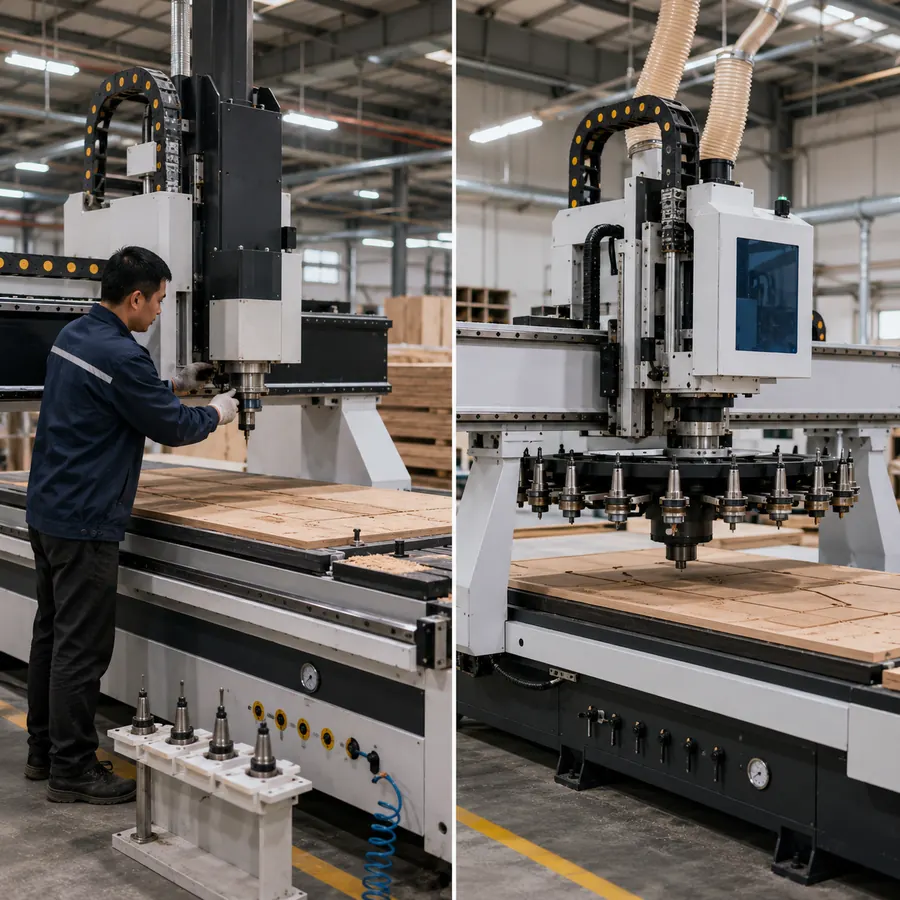
Start with the job
Start with one job you run all the time
Forget model names for a minute. Pick one job you run often and count the tools. How many times does the machine stop? Does someone have to walk back over, change the cutter, set Z and restart? Or is the real delay somewhere else?
Once you look at the job this way, the choice gets much easier. You can see pretty quickly whether ATC will save real production time or just add cost and extra parts to maintain.
Keep it simple
Three things that matter most
ATC is mainly about fewer stops
If the same jobs use several tools and the machine keeps stopping for manual changes, ATC can make the day run more smoothly.
A regular router can still be a serious production machine
No ATC does not mean small or weak. You can still have the working size, spindle, rotary setup or multi-spindle arrangement your work needs.
Fix the bottleneck you actually have
If loading, drilling, labeling, dust collection or the next machine in the line is slowing you down, a bigger tool magazine will not fix it.
When ATC starts to fit the workflow
If tool changes keep interrupting the job, compare ATC with a regular router
Choose ATC when:
- A normal job uses several tools and the changes repeat throughout the day.
- Cabinet doors, furniture parts, stairs or relief work need several operations in one program.
- The operator keeps stopping, changing tools, setting Z and restarting the job.
- You want prepared tool positions and more consistent tool-length management.
- One operator is also handling loading, unloading or inspection.
- You run repeat batches often enough for the saved change time to matter.
A regular router is often enough when:
- Most jobs run with one cutter or only an occasional manual change.
- Your work is mainly flat cutting, 2D profiling, V-carving, simple drilling or shallow relief.
- Simple signs, flat furniture parts or basic acrylic work make up most of the workload.
- Working area, workholding, spindle choice or dust collection matters more than automatic tool changing.
- Manual changes are not delaying delivery or tying up an operator.
- Your product mix changes often and there is no stable tool sequence yet.
If your jobs hardly change tools, ATC can sit there doing very little while the real problem is loading, workholding, CAM setup, drilling or dust extraction. Put the money where it actually saves you time.
First, don’t mix these up
A regular CNC router can still be a full-size production machine
In this article, “regular CNC router” simply means a router without an automatic tool magazine and automatic tool-change cycle. When the next step needs a different cutter, the operator changes it by hand.
That does not make the machine light-duty. It can still be industrial, heavy-duty, rotary-axis, multi-head or multi-spindle. We are only comparing how the tools are changed.
Machines that can still be non-ATC
- 3 Axis CNC Router.
- Entry Level 3 Axis CNC Router.
- Rotary Axis CNC Router without ATC.
- Multi-Head CNC Router.
- Multi Spindle CNC Router.
- Multi-Process CNC Router without an automatic tool magazine.
- Single-spindle machines with automatic tool sensor calibration.
Machines that solve a different job altogether
- ATC CNC Router.
- Nesting CNC Router or complete nesting production cell.
- 5 Axis CNC Router or five-axis machining center.
- PTP / CNC machining center.
- Dedicated drilling center or six-sided drilling machine.
- Complete panel furniture production line.
A tool sensor is not the same thing as ATC. A regular router can measure tool length or set Z automatically, but someone still has to put the cutter into the spindle. ATC is the part that stores tools and changes them automatically.
So what does ATC actually change?
The big win is simple: fewer stops for tool changes
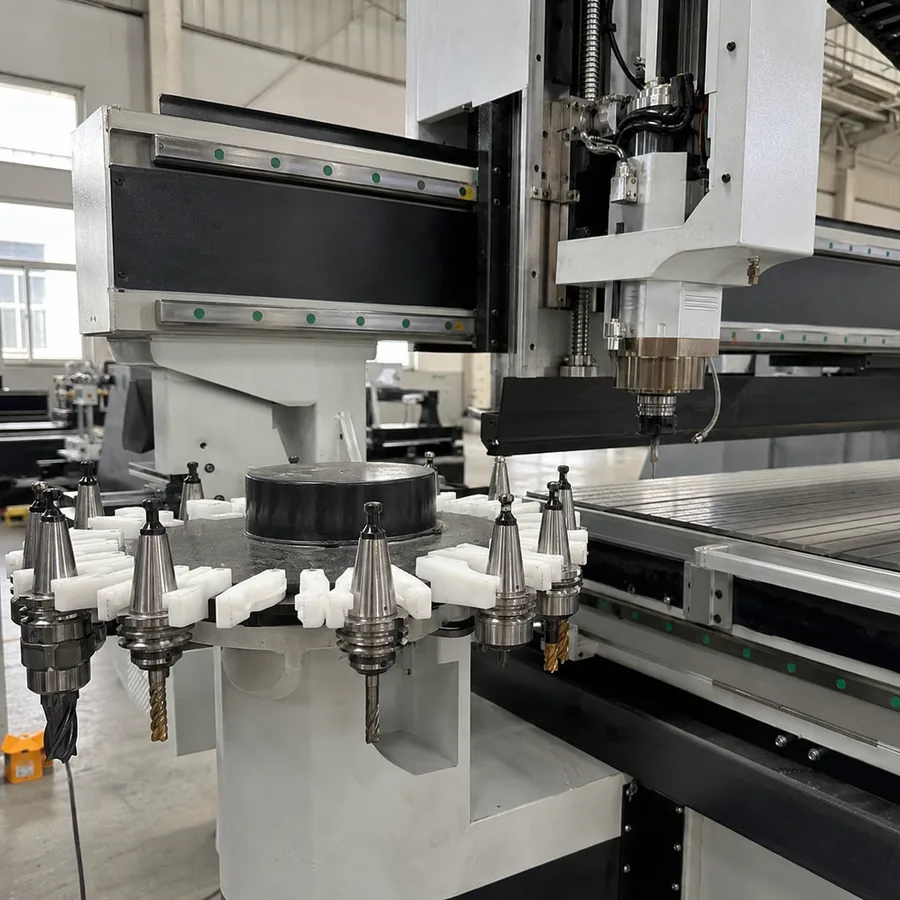
With ATC, the tools are already sitting in a linear or carousel magazine. The program calls the next tool and the machine swaps it on its own. With a regular router, the machine waits until the operator comes back and changes the cutter.
What ATC does not do is magically give you more axes, a bigger working area, better finish or higher accuracy. Those still come from the machine structure, spindle, workholding, tooling, CAM and cutting setup.
Take one job you run all the time and count the tool changes. If changes are rare, a regular router may be enough. If the operator keeps coming back to swap tools through every batch, ATC becomes the more practical workflow.
If you choose ATC
ATC adds a complete tool-change system, not just a magazine
Compared with a regular router, an ATC machine adds several linked parts: an ATC-capable spindle, tool magazine, holders, tool measurement, controller logic, sensors, and a stable compressed-air supply. Those parts have to work together for the automatic change cycle to be reliable.
| ATC adds | What to confirm before ordering | Why it matters in this comparison |
|---|---|---|
| Tool magazine and holders | Tool count, tool size, holder interface, and magazine layout. | You are paying for automatic storage and changeover, so match it to the tools your normal jobs actually use. |
| ATC spindle and tool measurement | Spindle/tool interface and how tool length is measured. | This is part of the automatic change system; a tool sensor by itself does not make a regular router an ATC machine. |
| Controller, sensors, and air supply | ATC control support, sensor logic, and the required compressed-air conditions. | These are additional systems that a manual-change router does not need for tool swapping. |
That is enough for an ATC-versus-regular decision. If you need to compare linear versus carousel magazines, tool capacities, spindle interfaces, controller options, or detailed ATC system design, continue with What Is an ATC CNC Router and How Does It Work?.
Let’s put them side by side
ATC or regular router? Here’s the practical difference
| What changes | Regular CNC router | ATC CNC router | What this means for you |
|---|---|---|---|
| Changing tools | The machine stops and the operator changes the cutter by hand. | The program calls the next tool and the machine changes it from the magazine automatically. | If you keep making the same manual changes all day, this is where ATC can save useful time. |
| The kind of work it suits | A good fit for flat cutting, 2D profiling, V-carving, drilling, shallow reliefs, signs and simpler furniture parts when tool changes are limited. | A better fit when cabinet parts, doors, furniture parts or other repeat jobs use several tools in the same program. | Look at how many operations and tool changes a normal part actually needs. |
| How often the operator has to come back | Someone needs to be there for each manual tool change and restart. | The operator can spend more time loading, unloading or checking parts while the machine handles the tool changes. | If someone keeps getting pulled back to the router just to change cutters, ATC can take that repeated job off their hands. |
| What comes with the setup | The tool side is simpler, with fewer ATC-specific parts to deal with. | You are adding an ATC spindle, magazine, tool holders, air supply, sensors and the control needed to run the tool changes. | Compare the whole machine setup, not just the starting price. |
| What you have to maintain | You still need to look after the spindle, collets, table, drive system and normal machine service items. | You also need to keep the tool holders clean, check the magazine, air supply, tool sensor and spindle clamping system. | ATC adds a few more things to keep clean and adjusted, so plan for that from the start. |
| Where ATC can save time | Works very well on jobs that stay on one tool, but repeated manual changes break up the cycle. | Works well on repeat multi-tool jobs because the machine does not wait for someone to change every cutter by hand. | Count how much time you actually lose to tool changes in a normal shift. That number matters more than the size of the magazine. |
| How predictable the jobs need to be | Simple and flexible when your work changes a lot or most jobs use only a few tools. | Gets more value from jobs with a clear tool list and repeatable programs. | If every job is completely different, ATC may not save as much as it does on repeat production. |
Make the choice from the workflow
Regular router or ATC? Use these four checks
| Check | Choose a regular CNC router when | Choose an ATC CNC router when |
|---|---|---|
| Tool use | Most normal jobs stay on one tool or only need an occasional manual change. | Normal jobs repeatedly use several tools in the same program or batch. |
| Operator interruption | Manual changes are easy to manage and do not keep pulling someone back to the machine. | The operator repeatedly has to stop other work to change cutters, set Z, and restart. |
| Production flow | Another step—loading, drilling, labeling, unloading, edge banding, or sorting—is the real bottleneck. | Tool-change interruptions are one of the clear reasons the router cycle keeps breaking up. |
| Tool plan | The tool sequence changes constantly or remains very simple. | You have a repeatable tool list that can be prepared in the magazine and reused across production. |
If you want to calculate saved labor time, changeover time, utilization, or return on investment, use the dedicated ATC CNC Router ROI guide. This page stays focused on choosing between the two machine setups.
A few common jobs
Here’s where each setup tends to fit
| Typical work | Where we would start | Why | What helps us choose |
|---|---|---|---|
| Simple signs and acrylic panels | Regular CNC router first; move to ATC if the same jobs keep calling several cutters and engraving tools. | Many sign jobs are tool-light. ATC only pays back when the changes repeat often enough. | Acrylic thickness, required edge finish, cutter types, chip control and workholding method. |
| Cabinet doors with cutting, grooving and profiling | 3-axis ATC CNC router. | The tool sequence repeats, so stopping for every cutter change quickly becomes wasted time. | Door size, material, profile tools, V-bits, drilling and finish requirements. |
| Flat cabinet parts and panel furniture | ATC router or nesting CNC machine, depending on the whole production flow. | Tool changing can matter, but loading, labeling, unloading and drilling may matter even more. | Sheet size, nesting layout, output target, drilling demand, labeling and loading method. |
| Complex curved doors and artistic relief | Review a rotary / 4-axis ATC setup after checking the part geometry. | Here the problem can be both machining access and repeated tool changes. | 3D model, maximum part size, rotary requirement, roughing and finishing tools, surface finish. |
| Parts with side holes and connector drilling | Look at drill bank, PTP, six-sided drilling or a furniture production solution. | ATC changes routing tools; it does not replace dense vertical and horizontal drilling equipment. | Hole map, connector system, side-hole quantity, drilling cycle and downstream assembly. |
| Occasional cylinder carving | A rotary-axis router without ATC may already be enough when tool variety is low. | The rotary function can matter more than automatic tool changing. | Diameter, length, fixture, tool count, carving depth and batch quantity. |
Where money gets wasted
These are the mistakes we see most often
Buying more tool positions than the job needs
A big magazine does nothing for output if a normal job only uses a few tools. Size it around repeat production, not the biggest number in a brochure.
Forgetting the air supply
ATC spindle release and tool-change actions need stable air. Check pressure, flow and air preparation before the machine arrives.
Treating a tool sensor like ATC
The sensor can measure tool length or set Z. It does not store tools and it does not change them.
Thinking more axes always means a better machine
3-axis, 4-axis and 5-axis machines solve different access problems. More axes only make sense when the part actually needs them.
A simple example
A 4-axis ATC setup can make sense — but only when the job needs both
Say you are making: custom wooden doors with curved surfaces and relief details. A 3-axis router can do part of the work, but the geometry is awkward, and the operator is also stopping over and over to swap roughing and finishing tools.
What is actually getting in the way: the machine needs better access to the part, and the manual tool changes keep breaking up the cycle.
What we would look at: a 4-axis ATC-R setup can solve both issues at once instead of forcing the job onto a simple 3-axis manual-change router.
Why it can work: the extra axis deals with the geometry; ATC deals with the repeated tool changes. Those are two different problems, so both parts of the configuration need a reason to be there.
And when it is too much: if the job is still simple one-tool cutting, this setup is overkill. The drawing and tool sequence have to justify it.
A door or relief example does not mean every woodworking shop needs 4-axis ATC-R. Start with your own drawing, material, tool list and output target.
Before the machine ships
Make the support plan clear before the order is finished
Before you order, make sure everyone knows who handles setup, training, software help, troubleshooting and spare parts. The exact support can change with the machine and the destination, so it is much better to clear this up early than after the machine arrives.
What we can help you with
- Machine and configuration selection before ordering.
- Material or process checks when a job needs verification.
- Setup and installation guidance.
- Remote troubleshooting through online support channels.
- Operator training, manuals and videos.
- Spare-parts coordination and warranty support according to the final agreement.
What you should make clear before ordering
- Whether on-site service is needed and what is included.
- Who handles installation at your location.
- Software and postprocessor support.
- Spare-parts scope for the selected machine.
- The exact service arrangement for your destination.
A lot of overseas setup and troubleshooting can be handled by phone, WhatsApp, email or online support. If you need on-site service or a different arrangement, get that agreed before the order so there are no surprises later.
Start with the part
Show us what you make first — then we can talk about the machine
The fastest way to narrow this down is to start with the part. Once we know the material, size, operations, tool sequence and output target, we can usually rule out the wrong machine types pretty quickly.
1. Show us one normal job
Send the material, working size, thickness, drawing, main operations and the tools used in a normal program.
2. Narrow down the machine type
That may be a regular router, ATC router, rotary / 4-axis router, nesting machine, PTP router or a wider furniture-production solution.
3. Then sort out the details
Spindle, table, tool magazine, controller, tool sensor, air system, software workflow and workshop utilities come after the machine category is clear.
You can also compare our CNC Routers, ATC CNC Routers, Furniture CNC Machines and Custom CNC Solutions.
FAQ
Still comparing ATC and regular CNC routers? Start with these questions
Is ATC always better than a regular CNC router?
No. ATC is useful when repeated tool changes are slowing down normal production. If most jobs run with one tool, or you only change tools once in a while, a regular router can be the better place to put the budget.
What do you mean by “regular CNC router”?
Here, it simply means a non-ATC router without an automatic tool magazine and automatic tool-change cycle. It can still be a full-size industrial 3-axis, rotary-axis, multi-head, multi-spindle or multi-process machine.
Which jobs are better suited to ATC than manual tool change?
Look at one normal production job. If the machine keeps stopping for several tool changes through every batch, ATC is the stronger choice. If tool changes are rare, a regular router will usually keep the setup simpler.
Linear or carousel magazine — which one should I choose?
Neither is automatically better. Start with the real tool count, tool size, machine layout, magazine position and how easy it is to reach for maintenance.
Does ATC make the machine more accurate?
Not by itself. ATC mainly keeps the job moving through tool changes. Finished-part accuracy still depends on the machine structure, spindle, holders, tooling, workholding, CAM and setup.
What should I send you if I want help choosing?
Send one typical drawing, the material, part or sheet size, the tools used in that job and your output target. That is usually enough to start narrowing the machine down.
Send us one real job and we’ll start from there
Send the material, drawing, working size, tool list and output target. From that, we can narrow the choice between a regular router, ATC router, rotary / 4-axis machine, nesting machine or a wider furniture-production setup.

Frannie
Hello, I’m Frannie, a CNC machinery specialist with 15 years of experience in the woodworking CNC industry. I help furniture factories, cabinet makers, woodworking workshops, and production businesses choose CNC machines that match their production needs, factory size, budget, and efficiency goals.
My work focuses on solving real production problems, including replacing outdated equipment, improving machining efficiency, reducing labor costs, and upgrading to smarter CNC solutions. I also support customers with machine installation guidance, operation training, video support, and on-site training when needed, helping them use their machines more confidently and effectively.





