ATC CNC Router Troubleshooting
Common CNC Tool Changer Problems: ATC Troubleshooting Guide
If your tool changer stops halfway through a cycle, don’t keep pressing reset. First look at where the sequence stopped. Did the spindle reach the tool-change position? Did the magazine move? Did the old tool release? Did the new tool clamp? That one detail usually tells you where to start looking.
Quick Answer
If the tool changer stops, first work out where the cycle stopped. Did the machine reach the tool-change position? Did the spindle orient? Did the magazine move to the correct pocket? Did the holder release? Did the next tool clamp?
Once you know that, the search becomes much smaller. You can start looking at the spindle, air supply, magazine movement, holder, sensor signal, tool data or controller sequence instead of guessing.
If a tool is loose, dropped, trapped, or the changer has already hit something, stop the machine. Don’t force the holder out, push the magazine by hand or change parameters just to make the alarm disappear.
Should You Keep Checking or Stop the Machine?
When an ATC stops, this is usually the first question that matters: Is it something you can safely check on the shop floor, or should the machine stay stopped until a technician looks at it?
This is useful for furniture factories, cabinet and door shops, panel processors, woodworking shops, sign makers, composite-material processors, CNC service companies, importers and distributors.
The sections below help you narrow down what probably went wrong, what you can check first and what information is worth sending when you need support. Exact alarm codes, sensor names, air settings and recovery commands still depend on the machine, controller, spindle and ATC design.
You May Be Able to Continue
If the problem turns out to be something simple and visible, such as contamination on an accessible surface or incorrect tool-table data, correct it first and then run a controlled tool-change test before cutting material again.
Plan a Service Check
Repeated timeouts, intermittent sensor signals, air leaks, indexing problems and increasing holder wear should not be ignored just because the machine starts working again after a reset.
Keep the Machine Stopped
Stop if a tool is loose or dropped, a holder is trapped, the spindle taper or pocket is damaged, the changer has collided, or the mechanism is sitting in an unsafe position.
How the Tool Change Actually Works
The exact sequence is different from machine to machine, but most ATC routers follow the same basic logic. The machine receives the tool-change command, moves to a safe position, stops and orients the spindle, finds the correct tool pocket, releases the old holder, picks up the new one, confirms the clamp and then moves the magazine back out of the way.
When the tool change fails, one of three things normally happened: the command was never completed, the part moved but not far enough, or the machine moved correctly but did not get the confirmation signal it expected.
Start from the last step that finished normally. For example, if the spindle reaches the tool-change position and orients correctly but the holder does not release, look at the release side first — air delivery, valve action, release movement or the tool-release mechanism — instead of starting with the magazine.
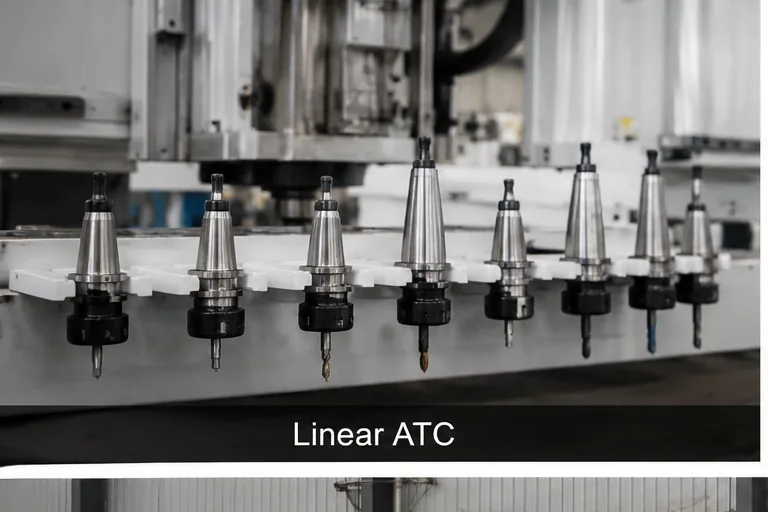
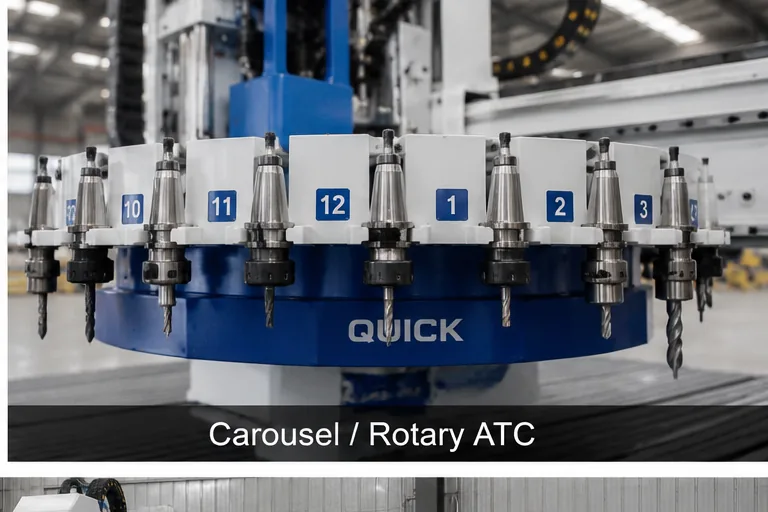
What to Do When the Tool Changer Stops
- Stop the automatic cycle. Don’t reach into the spindle or magazine area while the machine can still move or while stored air pressure is acting on the mechanism.
- Take a look before you reset anything. Note the alarm message, active tool, requested tool, pocket number, spindle position and where the holder is sitting.
- Work out the last movement that finished normally. There is a big difference between “the pocket did not move” and “the pocket moved but the controller did not see the signal.”
- Check the simple things you can see. Look for obvious chips, resin, a displaced holder, visible air leakage or a tool-table change. Don’t start adjusting pressure, sensors or parameters just because they look suspicious.
- Recover the machine using the correct procedure. A stopped tool-change cycle can leave the physical magazine position and the controller state out of sync.
- Test the tool change before loading material again. Confirm the correct tool, pocket, clamp state and clearance with a controlled dry cycle where the machine procedure allows it.
Don’t push the carousel or tool pocket by hand. Don’t force a stuck holder out. Don’t bypass a sensor or change PLC, macro or machine parameters just to clear the alarm.
These shortcuts may seem faster at the time, but they can leave the machine with the wrong position reference and turn a small fault into a dropped tool or collision on the next cycle.
Common CNC Tool Changer Problems and What They Usually Mean
| What you see | Where to look | What you can check first | What needs deeper checking | What to do |
|---|---|---|---|---|
| Tool change times out or stops halfway | Tool-change position, spindle orientation, air supply, magazine movement, sensor signal or sequence | Record the exact stopped point, alarm, requested tool, active tool and any visible obstruction | Sensor states, solenoid output, actuator movement, interlocks and controller sequence | Stop repeated retries and identify the failed step first |
| Spindle will not release the holder | Air delivery, release valve, tool-release mechanism, holder or spindle interface | Confirm the spindle is stopped and check for visible holder contamination or damage | Air flow during release, valve operation, seals, release travel and drawbar condition | Stop if the holder remains trapped or release becomes intermittent |
| Tool is loose, drops or will not clamp | Holder fit, spindle taper, clamp signal, tool-release mechanism or mechanical damage | Keep the machine stopped and look for visible holder or taper damage | Clamping mechanism, holder specification, taper condition and clamp confirmation | Do not run the spindle |
| Wrong tool or wrong pocket is selected | Tool table, pocket mapping, program call, controller state or magazine reference | Compare the requested tool, active tool and physical pocket | Pocket assignment, magazine reference, controller mapping and feedback signals | Correct the mismatch and dry-test the complete sequence |
| Magazine will not index or return home | Obstruction, drive or actuator, home sensor, pocket sensor or interrupted cycle | Look for chips, resin, displaced holders or an obvious obstruction | Drive condition, alignment, sensors, wiring and mechanical binding | Stop if a pocket or holder is visibly misaligned |
| Sensor alarm appears only sometimes | Contamination, loose wiring, sensor position, vibration, slow actuator or unstable air | Note whether it follows one tool, pocket, direction or time in the shift | Input signals, wiring, sensor position, response timing and actuator repeatability | Plan service before the fault becomes more serious |
| Tool changer has a collision or near miss | Machine position, tool length, pocket mapping, recovery state, fixture clearance or controller logic | Stop the machine and record the exact position before anything is moved | Reference positions, offsets, program, postprocessor, mechanism damage and sequence | Do not continue production until the cause is clear |
| Tool changes work when idle but fail during production | Air flow under load, temperature, dust, vibration, timing or holder condition | Compare when the fault happens, which tool is involved and the machine’s air indication | Dynamic air flow, timing, actuator load, holder condition and sensor response | Treat it as a repeat fault, not a one-time reset |
How to Check the Problem Based on What You See
1. The Tool Change Stops Before the Magazine Moves
Don’t assume the magazine is faulty just because it does not move. The machine may still be waiting for the correct axis position, spindle orientation or another interlock. Start with the last step that finished normally and check whether the controller and physical tool position still agree. If the fault started after a collision, maintenance or parameter change, record that before any recovery work begins.
2. The Holder Will Not Release, Clamp or Stay Secure
A holder that stays clamped, feels loose or drops points you toward the spindle release/clamp side first. Look for obvious contamination or visible holder damage, then check the correct air supply, holder specification, taper condition, release mechanism and clamp confirmation. If a holder is trapped or loose, keep the machine stopped and do not pry or retry it.
3. The Machine Calls the Wrong Tool or Pocket
Compare three things: the tool requested by the program, the tool the controller shows as active and the holder physically in the spindle or pocket. If they do not match, check recent tool-table changes, pocket assignments and whether an interrupted tool change left the magazine position out of sync.
4. The Magazine Will Not Index or Return Home
First look for chips, resin, a displaced holder or another visible obstruction. Then separate three cases: no movement, partial movement, or normal movement without a confirmation signal. A visibly misaligned arm, carousel or pocket should not be pushed back by hand unless the correct service procedure specifically calls for it.
5. The Fault Is Intermittent or Appears Only During Production
Intermittent faults often point to conditions that change with time or load: air flow, heat, dust, vibration, wiring, sensor position or actuator response. Record whether the problem follows one tool, one pocket or one part of the shift. If the ATC works when idle but fails in production, compare the conditions instead of treating every alarm as a separate event.
6. The Tool Change Finishes, but the Next Cut Is Wrong
If the mechanical change looks normal but the next cut is at the wrong depth or too close to a fixture, check tool data rather than the magazine first. Compare the physical tool with the controller record, tool length, active offsets, tool-setter result, program call and postprocessor output. If there has already been contact or a near miss, stop and find the mismatch before changing offsets.
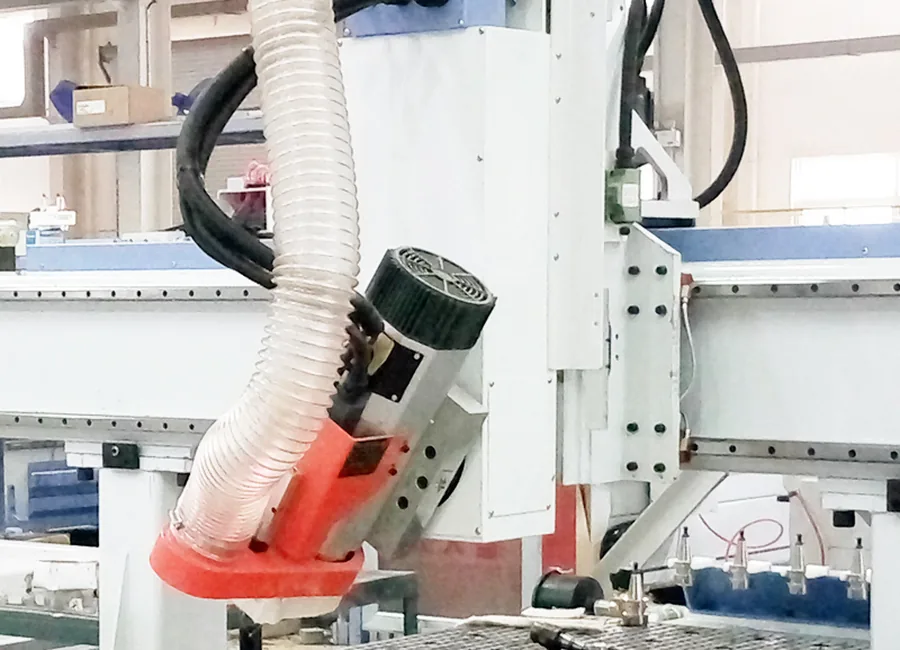
A Simple Way to Check the Problem
- Say exactly what happened. “The ATC doesn’t work” is too broad. Say where it stopped, which tool was called and what the magazine or spindle did.
- Separate command, movement and signal. Did the controller give the command? Did the component actually move? Did the expected signal come back?
- Check what changed recently. A new holder, tool-table edit, program update, maintenance work, collision, air-system work or moved sensor can quickly narrow the search.
- See if the problem follows one tool or one pocket. If the fault always follows the same holder or pocket, that is a strong clue.
- Change one confirmed thing at a time. If three adjustments are made at once, you may get the machine running again but still not know what caused the problem.
- Test the complete sequence. Before cutting again, make sure the correct tool is active, the pocket mapping is right, the holder is clamped and the magazine returns to the correct position.
If you need help, a short phone video is extremely useful. Start recording before the tool-change command and keep recording until the alarm appears.
Try to include the alarm screen, spindle, magazine position and machine sound. A complete short video usually tells us much more than a close-up photo taken after everything has already stopped.
Having an ATC Problem Right Now?
Send us the machine model, controller, ATC type, alarm message, active tool, requested tool and a short video of the failed sequence. That gives the service team a much better starting point than a message saying only “tool change failed.”
Send Us Your ATC Fault DetailsWhat You Can Check Yourself, and What Needs a Technician
| Item | What you can check | What should be handled by a technician |
|---|---|---|
| Machine state | Stop the machine, record the alarm, tool numbers, pocket and visible position | Recover a tool-change sequence when the controller and physical mechanism are out of sync |
| Cleaning | Clean accessible holders, pockets and sensor targets using the normal machine maintenance method | Remove covers, inspect internal contamination or restore mechanical alignment |
| Compressed air | Read the normal machine air gauge, look for obvious leakage and check routine filter or drain condition | Measure air flow under load, adjust regulators, test valves or cylinders and repair leaks |
| Tool data | Compare the program request, tool table and physical holder | Repair pocket mapping, lost reference, macros, PLC logic or machine parameters |
| Sensors and wiring | Note when the signal fails and whether it follows one tool, pocket or movement | Align, replace or electrically test sensors, wiring and controller inputs |
| Spindle and ATC mechanism | Stop if a holder is loose or trapped and look for visible damage or unusual sound | Check tool-release travel, clamping mechanism, spindle taper, orientation and magazine geometry |
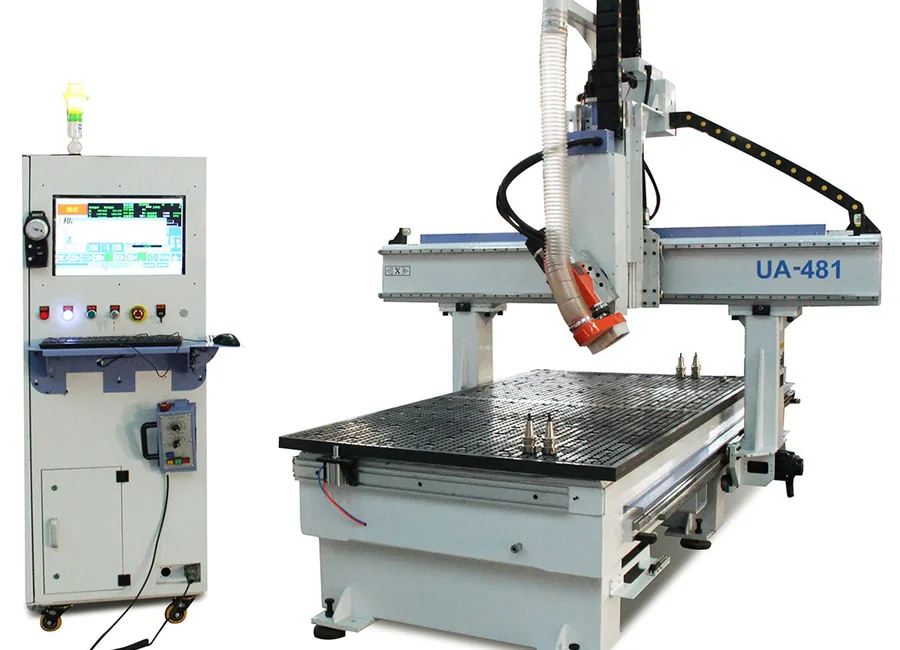
A Common ATC Troubleshooting Pattern
A common pattern is an ATC timeout followed by repeated resets. After several retries, the original stopped position becomes harder to trace and the risk of a wrong pocket position, loose holder or collision goes up.
A better response: stop retrying, record the alarm, requested tool, active tool and pocket position, then identify the last step that finished normally. Check the obvious air, contamination and tool-data conditions first; if the cause is not clear, keep the machine stopped and send the fault information for a proper service check.
How to Prevent Repeat Tool Changer Faults
- Check tool holders, visible pocket condition, air supply, leakage and recent alarms as part of normal production checks.
- Keep holders, spindle interfaces and pockets clean. Chips and resin can stop a holder from seating fully even when everything else is working.
- Keep the compressed-air system clean, dry and stable. If ATC faults become more common during busy production, check what happens to the air supply under load.
- Keep tool-table changes under control. Know when a tool number, pocket or tool length was changed and why.
- Don’t ignore an intermittent sensor or pneumatic fault just because the machine works again after a reset.
- Keep backups of controller data, tool tables and the machine settings that are meant to be backed up.
- Keep the correct recovery procedure close to the machine. A video from another ATC router is not a substitute for the procedure used on your own machine.
- Use the Quick CNC router maintenance checklist to organize routine checks and planned service work.
Two ATC systems can look almost identical and still use different air settings, sensor positions, holder interfaces or recovery steps. Use the values and procedure for your own spindle, controller and magazine instead of copying settings from another machine.
What to Send When You Ask for Support
- Machine model and controller.
- Exact alarm text or alarm code.
- Active tool, requested tool and the point where the tool-change sequence stopped.
- A clear photo showing the spindle, holder and magazine position.
- A short video starting before the tool-change command and continuing until the fault appears.
If available: add the serial number, spindle and ATC type, pocket number, whether the problem follows one tool or pocket, and any recent maintenance, collision, pneumatic, sensor, tool-table or controller changes.
What to Do Next
If the fault is still unclear, keep the machine in a safe stopped state and work from the exact point where the tool-change sequence failed. Do not keep resetting the ATC just to see whether it will run once more.
- Use the CNC router maintenance checklist for routine cleaning and planned checks.
- Record the five support items above before changing anything else.
- If the fault repeats or involves a loose/trapped tool, collision, lost position or unclear recovery state, send the details through the Quick CNC contact page.
FAQ
What is the most common cause of a CNC tool changer problem?
There is no single cause. Find the last step that worked normally, then check the next part of the sequence: spindle position, air/tool release, magazine movement, sensor signal, tool data or controller logic.
Can low air pressure cause an ATC alarm?
Yes. Low pressure, poor flow, leaks, water or restrictions can stop the spindle tool-release and other pneumatic ATC functions from completing correctly. Magazine actuation depends on the machine design.
Why won’t the spindle release the tool?
Check air delivery, the release valve, contamination, holder condition and the spindle release mechanism. If the holder is trapped or release becomes intermittent, stop retrying and have the system checked.
Why does my CNC router select the wrong tool?
Compare the requested tool, the controller’s active tool and the physical holder. Tool-table edits, pocket mapping, an interrupted change or a lost magazine reference can create a mismatch.
Can I manually move a stuck tool changer?
Do not force the arm, rack, carousel or pocket by hand. Use manual movement only when the correct recovery procedure for that machine specifically calls for it.
How do I reset an interrupted tool change?
Record where the spindle, holder and magazine stopped, then use the recovery procedure for that exact machine to bring the physical position and controller state back into agreement.
How often should ATC holders and pockets be cleaned?
Follow the machine instructions and actual production conditions. Heavy MDF dust, resin, long shifts and frequent changes can justify more frequent inspection and cleaning.
What should I send Quick CNC if I need help with an ATC fault?
Start with the machine model, controller, exact alarm, active/requested tool and stopped position, plus a short video of the failed sequence. Add other machine details if available.
References
- Quick CNC: CNC Router Maintenance Checklist
- Quick CNC: Linear vs Carousel Tool Changer
- Haas Automation: Tool Changer Troubleshooting Guides
- Haas Automation: Side-Mount Tool Changer Carousel and Pocket Troubleshooting
- Haas Automation: Tool Release System Troubleshooting
- Tormach: Automatic Tool Changer Troubleshooting

Frannie
Hello, I’m Frannie, a CNC machinery specialist with 15 years of experience in the woodworking CNC industry. I help furniture factories, cabinet makers, woodworking workshops, and production businesses choose CNC machines that match their production needs, factory size, budget, and efficiency goals.
My work focuses on solving real production problems, including replacing outdated equipment, improving machining efficiency, reducing labor costs, and upgrading to smarter CNC solutions. I also support customers with machine installation guidance, operation training, video support, and on-site training when needed, helping them use their machines more confidently and effectively.





